Where Your Claude Settings Actually Live: Mobile vs. Desktop vs. Browser
That's the thing nobody tells you about using Claude across a phone, a laptop, and a browser tab. It isn't one uniform tool that happens to have three windows. Some settings live on your account and follow you everywhere the moment you set them.

You're between meetings, phone in hand, trying to turn on Quiet Hours in Claude before your next call. You tap through every menu you can find. Nothing. You start to wonder if the feature got pulled.
It didn't get pulled. You're holding the wrong device.
That's the thing nobody tells you about using Claude across a phone, a laptop, and a browser tab. It isn't one uniform tool that happens to have three windows. Some settings live on your account and follow you everywhere the moment you set them. Others are wired to the physical device in your hand and don't exist anywhere else. Until you know which is which, every missing toggle looks like a bug.
I went through Anthropic's official Help Center, article by article, and mapped every setting I could find (38 of them) against all three surfaces: the mobile app, the desktop app, and the browser at claude.ai. This is independent research, not something Anthropic published or endorsed, compiled on July 28, 2026. Claude's settings move fast, so treat anything marked "unclear" below as a prompt to go check in-app, not a final answer.
The pattern once you group it
Thirty-eight individual rows is too much to hold in your head. Grouped by category, the picture simplifies fast:
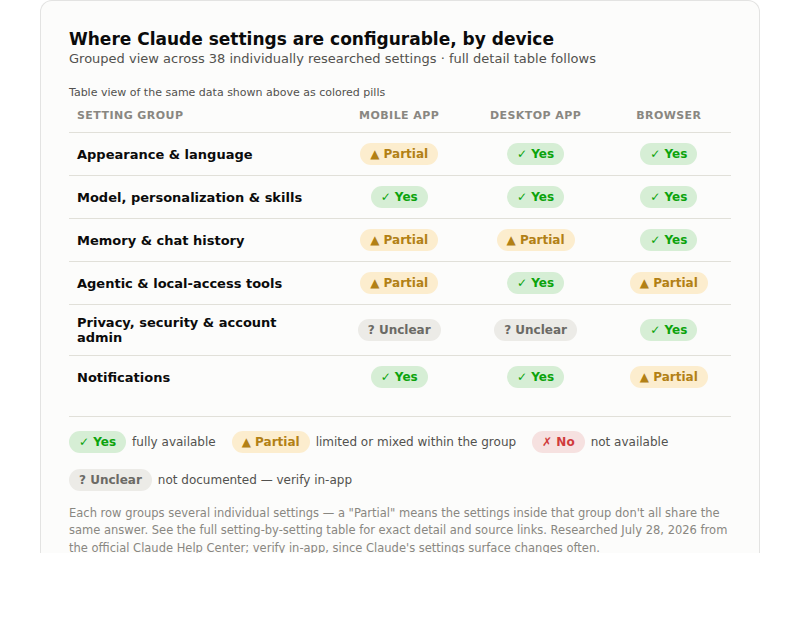
Two categories tell almost the whole story. Agentic and local-access tools (Claude Code, desktop extensions, Claude in Chrome, device connectors, Cowork with full local file access) belong to desktop hardware, with only artifact/MCP integration and Cowork's remote sessions reaching the browser. Privacy, security, and account admin (session management, data export, account deletion, the compliance API) live almost exclusively in the browser. Everything else is closer to fully synced, with a few partial exceptions worth knowing about before you go looking for them.
If your day looks anything like most project managers I work with, that split matters more than it seems. You're triaging on your phone between meetings, doing the deep configuration work at a desk, and leaving a browser tab open the rest of the day as a default workspace. Three different devices, three different jobs. Knowing which settings belong to which job means you stop wasting five minutes hunting for something that was never going to appear where you were looking.
The full breakdown
Legend: ✅ confirmed available · ❌ confirmed not available · ⚠️ partial or conditional · ❓ not explicitly documented — worth verifying in-app.
Appearance, language & personalization
| Setting | Mobile App | Desktop App | Browser | Source |
|---|---|---|---|---|
| Light / Dark / Match System mode | ✅ Yes | ✅ Yes | ✅ Yes | Appearance settings |
| Chat font (Default / Match System / Dyslexic Friendly) | ✅ Yes | ✅ Yes | ✅ Yes | Appearance settings |
| Sidebar collapse toggle (no full disable) | ✅ Yes | ✅ Yes | Appearance settings | |
| Language preference | ✅ Yes | ✅ Yes | ✅ Yes | Using Claude in your language |
| Break reminders | ✅ Applies (set on web/desktop) | ✅ Set here | ✅ Set here | Break reminders & quiet hours |
| Quiet hours | ✅ Applies (set on web/desktop) | ✅ Set here | ✅ Set here | Break reminders & quiet hours |
Model, personalization & skills
| Setting | Mobile App | Desktop App | Browser | Source |
|---|---|---|---|---|
| Model / Effort / Extended thinking selector | ✅ Yes | ✅ Yes | ✅ Yes | Model, effort & thinking settings |
| Instructions for Claude (account-wide) | ✅ Yes | ✅ Yes | ✅ Yes | Personalization features |
| Project instructions | ✅ Yes | ✅ Yes | ✅ Yes | Personalization features |
| Styles | ✅ Yes | ✅ Yes | ✅ Yes | Personalization features |
| Skills (enable / use / create) | ✅ Yes | ✅ Yes | ✅ Yes | Use skills in Claude |
| Projects | ✅ Yes | ✅ Yes | ✅ Yes | What are projects? |
| Artifacts | ✅ Yes | ✅ Yes | ✅ Yes | What are artifacts? |
| Web search toggle | ✅ Yes | ✅ Yes | ✅ Yes | Enable and use web search |
| Research mode | ✅ Yes | ✅ Yes | ✅ Yes | Use research on Claude |
| Connectors (web-based — Google Drive, Slack, etc.) | ✅ Yes | ✅ Yes | ✅ Yes | Skills, connectors & plugins |
| Incognito chats | ✅ Yes | ✅ Yes | ✅ Yes | Use incognito chats |
| Delete / rename individual conversations | ✅ Yes | ✅ Yes | ✅ Yes | Delete or rename a conversation |
Memory & chat history
| Setting | Mobile App | Desktop App | Browser | Source |
|---|---|---|---|---|
| Memory (generate memory from chats) | ✅ Applies to chats here | ✅ Applies + configurable | ✅ Configurable (Settings > Memory) | Chat search & memory |
| Search and reference past chats | ✅ Yes (paid plans) | ✅ Yes (paid plans) | ✅ Yes (paid plans) | Chat search & memory |
| Import / export memory | ❓ Not specified | ❓ Not specified | ✅ Yes | Import and export memory |
Agentic & local-access tools
| Setting | Mobile App | Desktop App | Browser | Source |
|---|---|---|---|---|
| Artifact persistent storage / MCP integration | ❌ Not listed | ✅ Yes | ✅ Yes | What are artifacts? |
| Device-specific connectors (Maps, iMessage) | ✅ Yes (mobile-only) | ❌ No | ❌ No | Download Claude |
| Desktop extensions (local file / browser / app access) | ❌ No | ✅ Yes | ❌ No | Download Claude |
| Claude in Chrome | ❌ Not supported | ✅ Yes | Get started with Claude in Chrome | |
| Claude Cowork | ✅ Yes (remote sessions only) | ✅ Yes (full experience incl. local files/browser) | ✅ Yes (remote sessions) | Cowork on web, desktop & mobile |
| Claude Code | ❌ No | ✅ Yes | ❌ No | Download Claude |
Privacy, security & account admin
| Setting | Mobile App | Desktop App | Browser | Source |
|---|---|---|---|---|
| Model training toggle ("Help improve Claude") | ✅ Yes (account-wide) | ✅ Yes | ✅ Yes (Settings > Privacy) | Model improvement privacy settings |
| Location metadata (for local search results) | ❓ Not specified | ✅ Yes (Settings > Privacy) | Privacy Settings & Controls | |
| Sensitive data / who can view conversations | ✅ Applies | ✅ Applies | ✅ Applies | Who can view my conversations? |
| Session security / active session management | ❓ Not specified | ❓ Not specified | ✅ Yes | Managing active sessions |
| Session security settings (e.g. SSO enforcement) | ❓ Not specified | ❓ Not specified | ✅ Yes | Configuring session security |
| Export your data | ❓ Not specified | ❓ Not specified | ✅ Yes | Export your Claude data |
| Delete your account | ❓ Not specified | ❓ Not specified | ✅ Yes | Delete my Claude account |
| Compliance API / org data retention (Enterprise) | ❌ No (admin, not personal) | ❌ No | ✅ Yes (org admin console) | Access the Compliance API |
| Monthly recap ("Reflect") | ❓ Not specified | ❓ Not specified | ✅ Yes | See your monthly recap |
Notifications
| Setting | Mobile App | Desktop App | Browser | Source |
|---|---|---|---|---|
| Push notification when a Cowork task finishes or needs input | ✅ Yes | ✅ Yes (native OS notification) | ❌ No native push (browser tab only) | Assign tasks from anywhere in Cowork |
| Scheduled / recurring task run notifications | ✅ Yes | ✅ Yes | ❓ Not specified | Cowork on web, desktop & mobile |
| In-app / email notification preferences (general) | ❓ Likely OS-level, no dedicated Claude toggle documented | ❓ Not documented | ❓ Not documented | No official article found — check Settings in-app |
| Status / incident subscriptions (email or SMS) | ✅ Yes (subscribe via status page) | ✅ Yes | ✅ Yes | Anthropic Status Page |
What this means for you
The account-level settings (instructions for Claude, project setup, memory preferences, style) get configured once, from whichever device happens to be in front of you, and they're there the next time you open a different one. That's most of what makes Claude feel like a thinking partner instead of a chat window: the accumulated context travels with you.
Claude Code, desktop extensions, and the full version of Cowork with local file access are built into the hardware you're sitting at, not bolted onto a cross-device feature with a rough mobile edge. Running Claude Code from your phone on the train isn't a settings problem to solve. That workflow lives on your laptop, full stop.
Managing your account itself, meanwhile, is a browser errand: checking which sessions are logged in, exporting your data, tightening session security, deleting the account. None of it lives comfortably anywhere else.
Knowing this in advance saves you from the moment I opened with: staring at your phone, positive a feature vanished, when it was never there to begin with.
Knowing where the switches live is table stakes, the operating system underneath everything else. The real skill is what you build once it's configured right: sharper outcomes, stakeholder reads you saw coming, thinking that holds up before you walk into the room. Get the settings out of the way so you can get to that.
What to do this week
- Set your core configuration once. Instructions for Claude, project instructions, styles, memory preferences: set them from any device and confirm they show up on the others. If they don't sync, that's worth reporting, not assuming is normal.
- Match your workflow to the right device. If Claude Code or desktop extensions are part of how you work, plan around desktop being the only place that happens.
- Bookmark this breakdown. Next time a setting seems to have disappeared, check which surface it belongs to before you assume something broke.
Which of these surprised you — something you assumed was universal that turns out to be tied to one device? I'd like to know what you find when you check your own setup.