How Markdown Has Come to Rule the World
What if the tool you're already using spoke a language you've never learned?
The format that powers GitHub, Obsidian, and every AI model you've ever used — and why project managers need to know it.
You've already seen it hundreds of times. Maybe thousands.
You've read it in GitHub documentation. Copied it from Notion pages. Seen it in ChatGPT and Claude responses. Pasted it into status reports without thinking twice.
The asterisks around bold words. The pound sign before headings. The dashes that turn into bullet lists. The simple symbols that make documents look clean when they render.
That's Markdown. And most project managers don't know they're reading it.
Here's why that matters now more than it ever has.
A Writing Tool That Ate the Internet
Markdown was created in 2004 by John Gruber, a blogger in Philadelphia. His goal was simple: a writing format readable as plain text, without looking like code. He called it Markdown — a pun on "markup." Aaron Swartz helped shape the syntax before launch. Gruber announced it in the spring of 2004, released version 1.0 that December, and stopped.
He didn't need to keep going. GitHub picked it up in 2008. Stack Overflow, Reddit, Notion, Obsidian, and VS Code each followed. By 2020, it had become the default format for developers and knowledge workers alike. In 2016, it was officially registered as its own media type: text/markdown.
Not bad for a weekend project.
Why AI Is Fluent in It
Here's where the story gets interesting for you.
Every major large language model (GPT, Claude, Gemini, Llama) was trained on enormous amounts of Markdown. GitHub READMEs. Stack Overflow posts. Reddit threads. Jupyter notebooks. Billions of documents, all formatted in Markdown.
AI doesn't speak it because someone decided it should. AI speaks it because that's what the internet speaks.
This creates two concrete advantages when you use Markdown in your work with AI:
The first is tokens. Tokens are how AI measures and processes text. An unstructured wall of prose gives the model nothing to orient by. It processes every sentence with equal weight. A Markdown-structured document is different. Headers name sections upfront. Bullets separate parallel items cleanly. Bold terms signal priority. The model's attention goes to your content, not to inferring what it's looking at.
The second is structure. Headings tell the model where sections begin and end. Lists tell it you're enumerating parallel items. Bold text tells it what matters. These are structural cues that shape how the model parses and responds to your input.
Here's a concrete example. The instructions that tell Claude how to behave (its configuration and memory) are stored in .md files. AI was trained on Markdown. In many tools, it's also configured through it. When you give it a wall of unstructured prose, you're making it work harder for a worse result.
What This Means for Project Managers
PMs write constantly. Briefs, plans, status updates, stakeholder summaries, risk registers, retrospective notes. Every one of those documents is a potential AI input.
And most of them are walls of prose.
Four things get you most of the benefit Markdown offers:
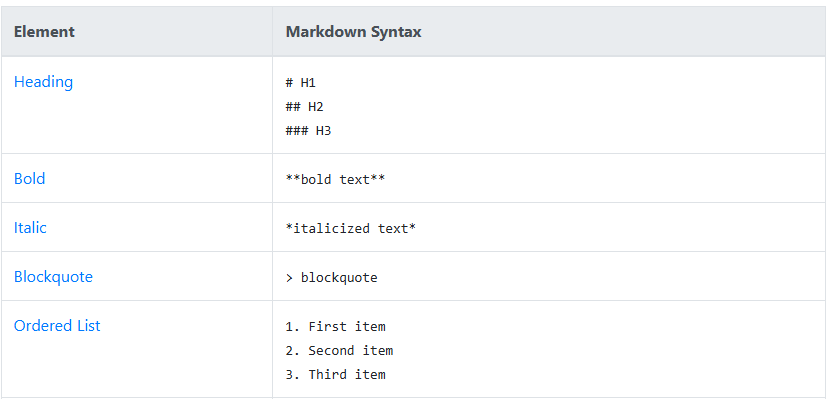
#before a line to make it a heading-or*before a line to make it a bullet**double asterisks**around text to make it bold- a blank line between sections so the model knows where one idea ends and another begins
Four conventions. That's what separates a prompt that gets a generic response from one that gets output that's actually useful.
There's a deeper point here, though.
When you structure a document for AI, you're also forcing yourself to clarify what matters — before the AI ever reads it. Structure is how thinking gets visible. That's the first move in any Intentional Intelligence practice: getting clear on what matters before execution begins. Markdown just makes that clarity visible to the AI.
Strategic PMs understand the tools they use. Not at the code level — at the thinking level. Knowing that AI reads structure and processes Markdown natively changes how you interact with it. You stop writing at AI and start writing for it.
That's the shift. From tool-user to strategic user. Same AI. Better output. Because you understood how it works.
This Week's Prompt
Use this to convert one of your existing documents into Markdown and see the difference in output quality:
Copy/paste into Claude or ChatGPT:
WHO: Act as a document structure specialist
WHY: because I want to improve the quality of AI responses when I use my documents as context
WHAT: take the document I paste below and reformat it using clean Markdown structure — appropriate headings, bullet lists, bold for key terms, and clear paragraph breaks
HOW: return the reformatted version only, then add a one-paragraph note explaining the structural choices you made and why they'll produce better AI responses
[Paste your document here]
Run it and see what your document looks like to an AI.
This Week's Challenge
Pick one document you write every week (a status report, a meeting summary, a project brief) and write it in basic Markdown this time.
Use # for section headers. Use - for bullet points. Bold the key decisions and outcomes.
By week three, the structure is already in your head.
Then use it as context in your next AI prompt. Compare the response to what you normally get.
One document. One week. Notice what changes.
You were already using it. Now use it on purpose.
What's one document you write every week that could become a better AI input if it had some structure?
Get Intentional, Paul
P.S. If you've been using AI for work and not getting the outputs you expected, contact me and tell me what you're prompting. There's a good chance the structure around your prompt is doing more damage than the prompt itself.
P.P.S If you want to learn Markdown, start here: